Turnitin Similarity Score Check Before Submitting

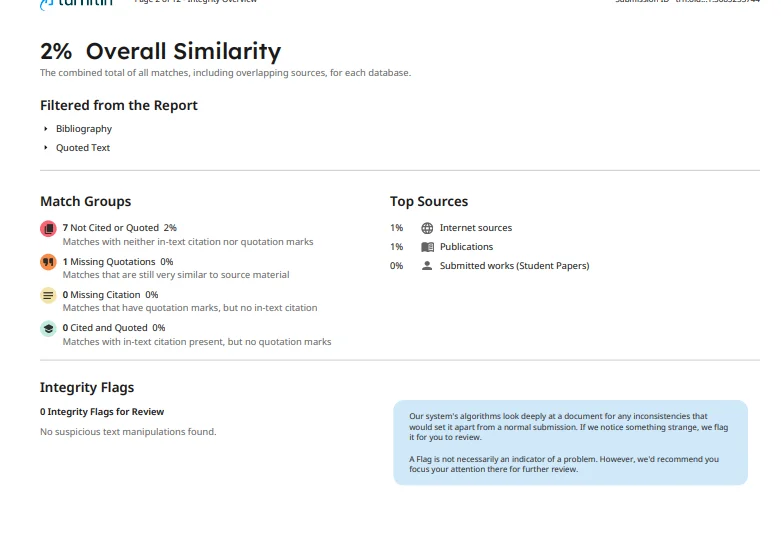
Yes — you can see the exact similarity report your professor will see, before you submit. The trick isn't timing, it's storage: the check has to run without adding your paper to Turnitin's student repository. As for the number itself, most instructors treat anything under 15–25% as normal, and a well-cited paper can legitimately sit higher than that. The goal isn't 0% — it's knowing what each match actually is. One more thing before we start: similarity and AI writing are two separate numbers on the report, and this guide covers the first one.
A note on authorship. Transparency first: this comes from InDetect, a third-party pre-submission checker with no affiliation to Turnitin. We run your upload through authorized instructor accounts configured for no repository storage, and every screenshot here comes from our own test paper — no real student data. We sell the check this article describes, so read us with that in mind.
Key Takeaways
A pre-submission similarity check is possible; the thing that matters is the storage setting, not the timing.
Standard class submissions go into the Student Paper Repository and can "self-match" later. No Repository checks don't.
15–25% is common instructor tolerance, not an official rule. A single source above ~3% is worth a look even when the total is low.
Similarity isn't plagiarism, and it isn't the AI score — three different numbers, three different fixes.
Paste-box "Turnitin checkers" can't query Turnitin's databases. Only the real engine produces a real similarity report.
1. What the Similarity Score Actually Measures
Turnitin compares your extracted text against three things: billions of indexed and archived web pages, licensed scholarly and publication content, and its repository of previously submitted student papers. Every match gets a source entry and a percentage.
The headline number is the share of your words that overlap something in those databases — after your instructor's settings are applied. That last part matters more than students realize. The exclude quotes and exclude bibliography toggles, plus the small-match filter (commonly set at 1 word or 1%), all change the score without changing your paper. A 22% under one instructor's settings can read 12% under another's.
So the percentage isn't a property of your writing. It's a property of your writing plus the settings. When you check before submitting, you want the report generated with realistic settings and, above all, with no repository storage — sections 4 and 5 explain why.
2. Similarity Score vs AI Score: Two Numbers, Two Jobs
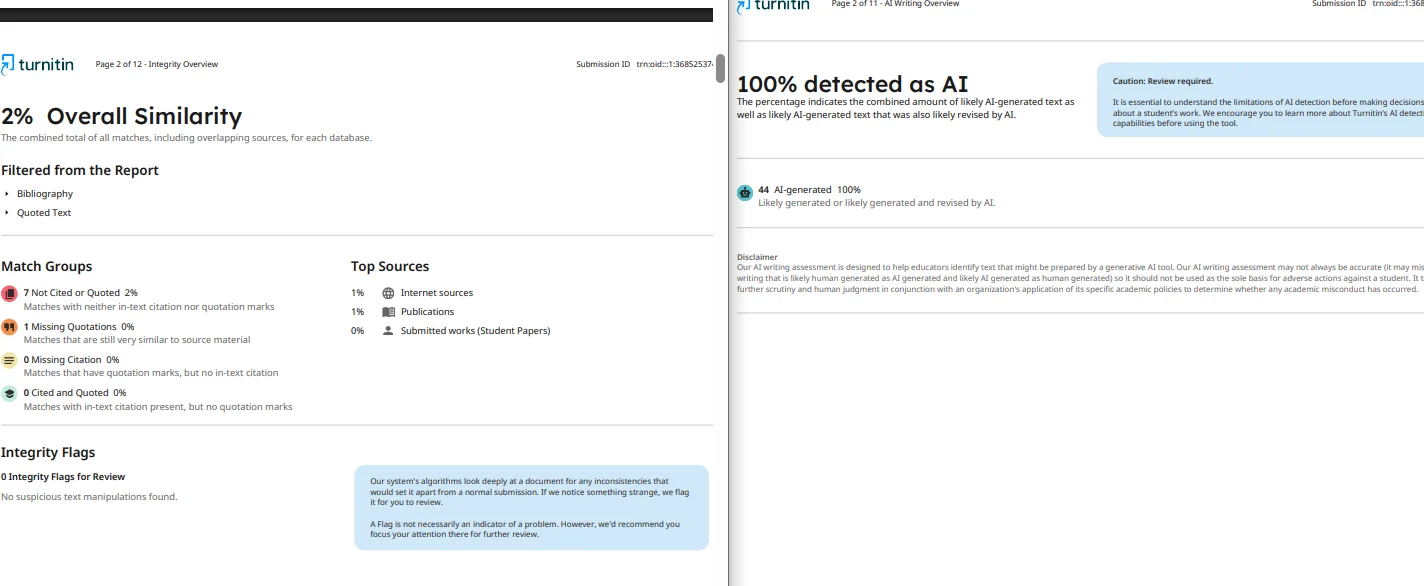
Modern Turnitin reports carry two scores, and students mix them up constantly.
Similarity asks: does this text overlap existing text? The AI writing panel asks: does this read like a language model produced it? A paper can be fully original and still flag high on AI — formal, evenly-rhythmed prose does that. A copied paper can show a low AI score — the detector doesn't care where the text came from, only how it's written.
The two numbers sit side by side on the same report but move independently. Fixing citations won't budge the AI percentage, and rewriting for rhythm won't budge similarity. If you want the panel-by-panel walkthrough — including why the AI score sometimes shows as *% instead of a number — read our guide on how to check a Turnitin AI report.
3. What Similarity Percentage Is Acceptable?
No official safe line exists — Turnitin doesn't publish one, and every instructor draws their own. From what universities state publicly and instructors report, the working ranges look like this:
Under 15%: rarely questioned.
15–25%: accepted as normal by many instructors, especially with properly cited sources.
Above 25%: invites a look at the source list — not an automatic accusation.
Any single source above ~3%: worth reviewing even when the total is low, because one concentrated match is a different problem than forty scattered ones.
Long quotations, literature reviews, and methods sections with standard phrasing legitimately raise the number. The right posture isn't squeezing toward 0% — it's being able to explain every match above a couple of percent. Check your syllabus and your school's policy; those beat any internet rule of thumb, including ours.
4. "Will My Paper Show Up in Turnitin If I Check It First?"
This is the fear that keeps students from pre-checking at all, so here's the direct answer: it depends entirely on how the check is run.
A normal submission to a class assignment is stored in the Student Paper Repository. Once stored, your paper becomes part of the database every future report is checked against — including your own final submission. Check the wrong way and your final paper matches itself at or near 100%, which reads as self-submission and triggers exactly the conversation you were trying to avoid.
A check run with the No Repository setting doesn't store anything. Many instructors use this setting deliberately for draft checkpoints, and legitimate third-party services are configured the same way. On InDetect, uploads never enter the repository, and both the paper and the report are deleted within 24 hours.
The honest warning: not every service honors no-repository settings, and a misconfigured one can archive your paper. Before uploading anywhere, confirm the service states no repository storage and a deletion window — in plain language, not buried in legal text.
5. How Students Check Similarity Without a Class ID
You can't create your own Turnitin account, and submitting to a class requires the class ID your instructor controls. Two realistic paths exist.
5.1 Option A — Ask Your Instructor for a Practice Draft
Some schools run draft submissions in a no-repository setup before the real deadline. It's free and fully sanctioned. The limits are obvious: your instructor has to offer it, and the timing may be a week later than you need. Ask early in the term, not three days before the deadline.
5.2 Option B — Third-Party Real-Engine Pre-Check
Services route your upload through authorized instructor accounts with no repository storage and return the actual report. Expect 5–30 minutes, not instant — the engine queues real submissions, and anyone promising a Turnitin report in ten seconds is running a simulator. New users in eligible countries get one free check (availability depends on your country); otherwise Lite runs $9/month for 2 checks ($4.50 each), with both the similarity and AI reports included every time.
One trap to avoid: paste-box "Turnitin checkers" that return a number in seconds. They can't query Turnitin's databases — they run their own model and guess. A real similarity report needs the real engine. Our breakdown of the free Turnitin AI detection market shows how to tell the two apart in thirty seconds.
6. Reading Your Similarity Report Before Deadline
Once the report lands, work it like a checklist, not a verdict.
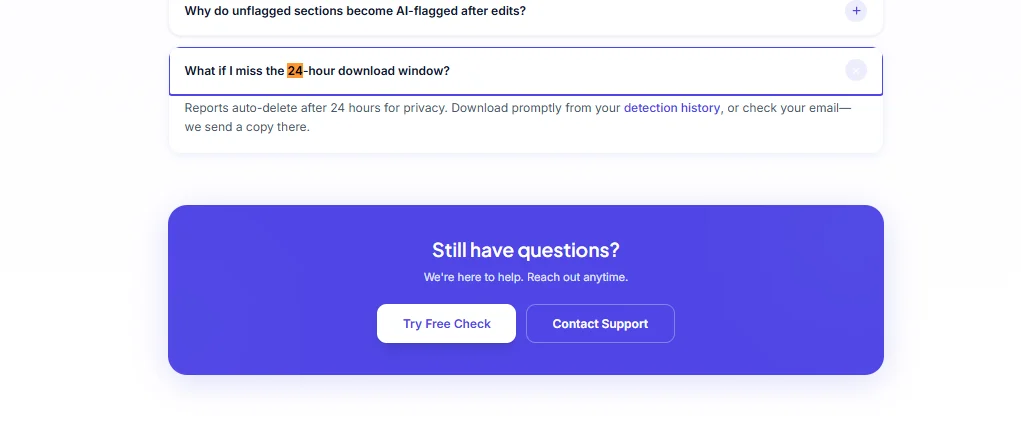
Start with the source list in the sidebar: matches ranked by percentage. Ignore the color of the headline number and read the entries. Forty web matches at 0.5% each are boilerplate phrases. One match at 9% on your argument paragraph is the thing to fix.
Then use the filters: toggle exclude-quotes and exclude-bibliography on. If the score drops from 24% to 11%, your citations were doing the matching — that's fine, that's what quoting looks like. If it barely moves, the overlap is in your own prose.
Finally, open the document view and read the highlights in context. Overlapping definitions and standard terminology are normal. Overlapping analysis needs paraphrasing and citation. For the full panel-by-panel tour, see how to check a Turnitin AI report; if it's the AI number that worries you instead, our rewrite guide on lowering your Turnitin AI score covers that side.
7. FAQ: Pre-Submission Similarity Checks
Can I check my paper on Turnitin before submitting it? Yes, two ways: an instructor-run draft submission with no repository storage, or a third-party service that runs the real Turnitin engine through authorized accounts. You cannot self-serve through Turnitin itself — students don't get personal accounts.
Will Turnitin save my paper if I check it first? Only if the check runs with repository storage enabled. A properly configured no-repository check doesn't store anything, so your final submission can't match your own draft. Confirm the no-repository setting and a deletion window before uploading anywhere.
What similarity percentage is acceptable on Turnitin? There's no official number. Many instructors treat under 15–25% as normal depending on the assignment, and any single source above roughly 3% deserves a look regardless of the total. Your school's policy beats any general rule of thumb.
Does a high similarity score mean plagiarism? No. Similarity measures text overlap — quoted material, common terminology, and your own prior submissions all raise it. Plagiarism is a judgment about attribution. Read the source list before you panic.
Can I get a Turnitin similarity report without a class ID? Not directly from Turnitin — class IDs come from instructors. Ask your instructor for a draft slot, or use a real-engine third-party service. Avoid paste-box tools: they can't access Turnitin's databases and their "similarity score" is a guess.
8. Check the Number Before Your Professor Does
The whole game is seeing the real report, with the real source list, while you can still fix things — and making sure the check doesn't archive your paper. Run it no-repository, read every match above a couple of percent, and cite what survives.
One free check for eligible new users (availability depends on your country), or Lite at $9/month for 2 checks ($4.50 per paper). Reports take 5–30 minutes; papers and reports are deleted within 24 hours.