How to Check a Turnitin AI Report: Every Panel Explained

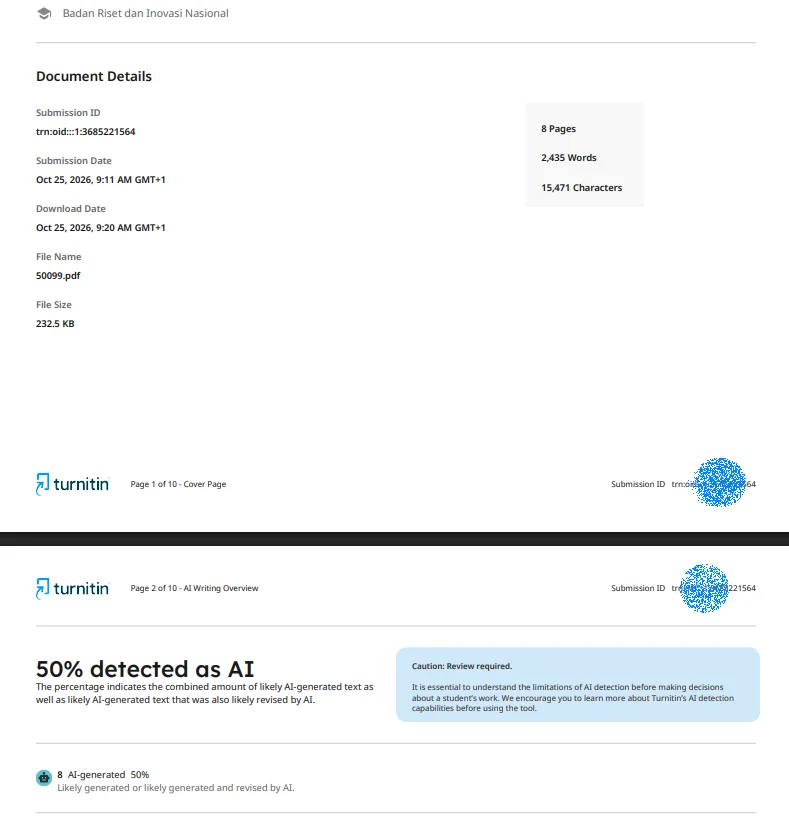
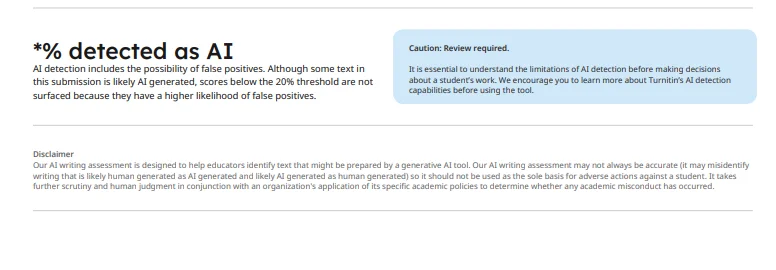
Short answer: a Turnitin report carries two independent numbers — a similarity percentage and an AI writing percentage — and neither means what most students assume. If the AI score lands between 1 and 19%, the report shows *% instead of a number. Turnitin discloses an error margin of roughly ±15 percentage points. And text below the qualifying-word threshold isn't analyzed at all, which is why short or quote-heavy papers show gray highlights or a dash. This walkthrough labels every region of a real report so you can read yours without guessing.
A note on authorship. This guide comes from the team at InDetect, a third-party pre-submission checker that runs the real Turnitin engine through authorized instructor accounts. We're not neutral — we sell the check this article teaches you to read. Every screenshot below is from our own test paper, not a real student's submission.
Key Takeaways
Similarity % and AI % are separate measurements with separate fixes. A high one tells you nothing about the other.
An AI score of 1–19% displays as *% by design; a gray dash means the text was never processed.
Only "qualifying words" enter the AI analysis. Under roughly 300 words, the number isn't reliable.
Exclusion and small-match filters change the similarity figure without touching your text — know which settings your school runs.
The report looks the same whether your professor generates it or a pre-submission service does, because it's the same engine.
1. The Full Report Map
Every Turnitin Similarity Report has five regions, and once you can name them you can stop panicking over the colors.
The header carries submission metadata: title, author, submission date, and word count. The similarity sidebar (usually right) holds the overall similarity percentage and the ranked list of matched sources. The AI writing panel shows the document-level AI percentage and per-sentence flags. The document viewer in the middle displays your text with color-coded highlights from both checks. The toolbar gives you the filters: exclude quotes, exclude bibliography, small-match threshold.
Sections 2 through 5 zoom into one region each. Nothing here is invented — this is the layout Turnitin's own help documentation describes, shown on a real report from our test paper.
2. The Similarity Sidebar: Score, Sources, Exclusions
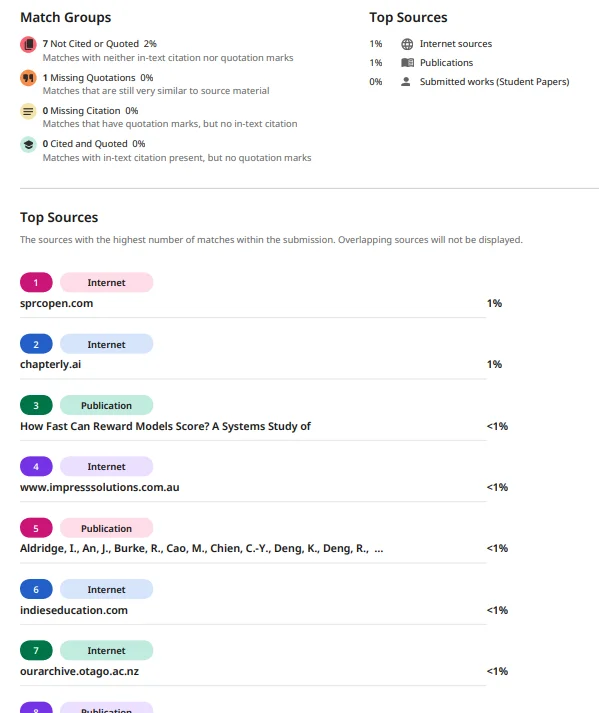
The big number at the top of the sidebar is the percentage of your text that matched something in Turnitin's databases. The colored bands (green through red) are instructor-facing conventions, not official verdicts — Turnitin doesn't define "plagiarism" by color.
Below the score, matched sources are ranked by percentage. Each entry is one web page, one journal article, one student paper. A 14% total might be two sources at 6% or forty sources at 0.4% — completely different situations, and the list tells you which you have.
Two settings quietly move the number. The small-match filter ignores matches below a threshold (instructors commonly set it at 1 word or 1%, so tiny phrase overlaps vanish). The exclude quotes / exclude bibliography toggles strip matched quotations and reference entries from the score. Same paper, different settings, different number — which is why you should check what your school uses before trusting any percentage you see elsewhere.
3. The AI Writing Panel: Document % vs Sentence Highlights
The AI panel answers a different question than the sidebar: not "does this match existing text?" but "does this read like a language model wrote it?"
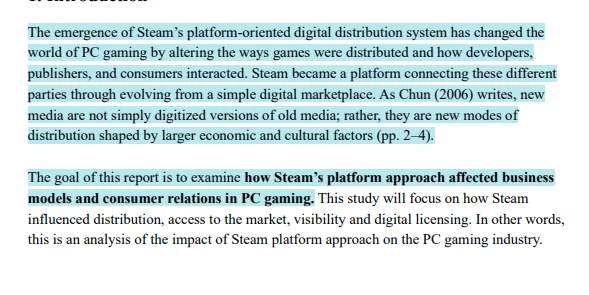
The document percentage is the share of analyzed text the model judged likely AI-generated. Underneath it, individual sentences get flagged as "might be AI-generated" or "might contain AI-generated text." Those are the model's official qualifiers — Turnitin doesn't say "is AI-generated."
Here's the confusion we see most: students fixate on the percentage and ignore the highlights. The highlights are the actionable part. They show you exactly which sentences triggered the model, sentence by sentence.
You'll also notice some of your text is gray or unmarked. That's not a pass — it means the text wasn't analyzed: too short, quoted, or below the qualifying-word floor covered in section 5.
4. The *% Case and the Dash: Hidden Scores and Unprocessed Text
Sometimes the AI panel shows % instead of a number. That's not an error and not a punishment. Turnitin hides exact figures when the AI percentage falls between 1 and 19%, because in that low-confidence band the false-positive rate is high enough that displaying a precise number would mislead instructors. % means "a small amount, within the range where the detector can't be sure."
A gray dash means something else entirely: the document wasn't processed for AI at all. That happens when the paper is too short for the model to run, or when the instructor's settings didn't enable AI detection for the assignment.
The full mechanics of the asterisk — including why chasing a displayed number under 20% is chasing a ghost — are covered in our dedicated explainer on the Turnitin asterisk percentage.
5. What Are Qualifying Words?
The AI detector doesn't chew through every word on the page. It counts qualifying words — the portion of your document that's long enough and continuous enough to analyze. Short passages, block quotations, and reference lists typically don't qualify.
Two practical consequences. First, a 150-word discussion post may return a dash or a wildly unstable percentage — there isn't enough signal. Around 300 words is where the panel starts being worth reading. Second, a long paper that's mostly quoted material can show a low analyzed word count even though the document is 4,000 words.
You can see the qualifying-word count in the report itself. Check it before you argue with the percentage: if the model only analyzed 200 words, the number carries 200 words of confidence.
6. Similarity vs AI: Two Independent Numbers, Two Different Fixes
Students constantly conflate these, so here's the clean version.
High similarity means overlap with existing text. The fix is citation work: proper quotation, real paraphrasing, checking that your references aren't matching by accident. Our guide to checking your similarity score before submitting covers what percentages instructors actually treat as normal.
High AI means the detector judged your prose statistically model-like. If you wrote it yourself, that's a false positive, and the fix is rhythm and specificity editing — the techniques in our guide on how to lower your Turnitin AI score.
A paper can be 5% similar and 60% AI-flagged, or 40% similar and *%. The numbers don't correlate. Fixing one doesn't move the other. And across both, remember the ±15 percentage-point error margin Turnitin itself discloses: read the highlights, not the headline.
7. FAQ: Reading a Turnitin Report
How do I check my Turnitin AI report? Students don't have direct Turnitin access — reports are generated by instructor accounts at subscribing institutions. Ask your instructor to share the report, or use a pre-submission service that runs the real engine. Either way the layout is the same: similarity sidebar, AI writing panel, document viewer.
What's the difference between similarity and AI score on Turnitin? Similarity measures text overlap with existing sources. The AI score measures how much of your analyzed text the model judged likely machine-generated. They're independent: original human writing can score high on the AI panel, and copied text can score low.
Why does my Turnitin AI score show % instead of a number? Because the score falls between 1 and 19%. Turnitin hides exact figures in that band since the false-positive rate makes small numbers unreliable. % is generally the range you want.
What percentage of a Turnitin report counts as qualifying words? There's no fixed percentage — qualifying words depend on document length and structure. Short passages, quotations, and reference lists are excluded. Papers under roughly 300 words often can't be analyzed at all.
What is a good Turnitin AI percentage for a paper? Turnitin publishes no passing threshold, and schools set their own expectations. Given the disclosed ±15 percentage-point error margin, treat any single reading as approximate and focus on which sentences got flagged.
8. Now What: Acting on Each Number
You can't act on a report you don't have. If your school won't share reports before the deadline, get one yourself: InDetect delivers the real Turnitin report — both numbers, all panels — in 5–30 minutes, with zero repository storage and deletion within 24 hours. New users in eligible countries get one free check (availability depends on your country); Lite is $9/month for 2 checks ($4.50 each). Not sure which services actually run the real engine? Our Turnitin checker tools guide sorts them. Then read your report against this article, panel by panel.