Turnitin *% AI Detection: What the Asterisk Actually Means

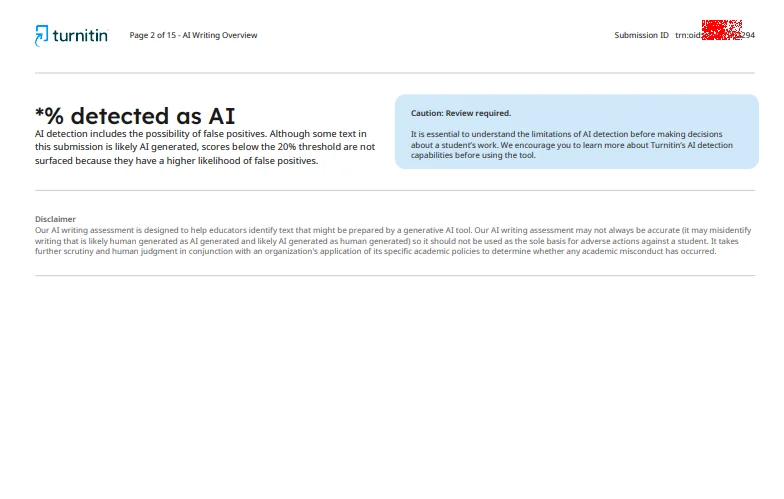
Direct answer — a *% on your Turnitin AI writing report is not a bug, not a redaction, and not an accusation. It means Turnitin's model scored somewhere between 1% and 19% of your qualifying text as "possibly AI," and Turnitin deliberately refuses to show the exact number because, in its own words, scores in that range "have a higher likelihood of false positives." The asterisk is Turnitin telling you and your instructor: there is a faint signal here, and we do not trust it enough to put a number on it.
A note on authorship. This article is published by the team behind turnitindetect.app, a service that connects students to authorized instructor-level Turnitin accounts so they can preview the real AI writing report their professor sees. We have an obvious interest in students understanding this number correctly — but the interpretation below is sourced from Turnitin's own documentation, quoted verbatim wherever possible. Check the primary source yourself.
Key Takeaways
*% means your AI detection score landed in the 1–19% range. Turnitin does not display the exact figure.
The threshold is 20%. At 20% and above, you get a real number and sentence-level highlights. Below it, you get the asterisk and no highlights.
Turnitin introduced this behavior on July 8, 2024. Reports generated before that date may still show a numeric score under 20%.
0% and % are different states. 0% means no qualifying text was flagged at all. % means something was flagged, but not enough to be trusted.
Most instructors treat *% as effectively clear. But "effectively clear" is not the same as "Turnitin proved you wrote it yourself."
The asterisk is a statement about the model's confidence, not about your paper. It is the least reliable result the system can produce.
1. What the Asterisk Actually Is
Turnitin's AI writing indicator can display several distinct states. Reading them correctly is the whole game.
1.1 The exact wording from Turnitin
From Turnitin's official AI Writing Report guide:
"Our testing has found that there is a higher incidence of false positives when the percentage is between 0 and 19. In order to reduce the likelihood of misinterpretation, the AI indicator will display an asterisk (*) for percentages between 0 and 20 to call attention to the fact that the score is less reliable."
And on the report itself, the disclaimer text you see next to the asterisk:
"AI detection includes the possibility of false positives. Although some text in this submission is likely AI generated, scores below the 20% threshold are not surfaced because they have a higher likelihood of false positives."
Read the second sentence carefully, because it is the one that causes the most panic. It says "Although some text in this submission is likely AI generated." That is not Turnitin accusing you. That is Turnitin describing what its model would have said if it had been allowed to show the number — and then immediately explaining why that claim should not be trusted. The disclaimer is a hedge, and the hedge is the point.
1.2 The four states of the AI writing indicator
Indicator | What it means | Highlights shown? |
|---|---|---|
0% | No qualifying text was identified as likely AI-generated | No |
*% | Score fell between 1% and 19%. Turnitin refuses to surface the number | No |
20%–100% | Score is at or above the confidence threshold | Yes — flagged sentences highlighted |
- - (gray) | Report could not be processed at all | Not applicable |
The gray - - state is worth understanding separately, because students sometimes confuse it with the asterisk. Gray means the submission was never scored: it predates Turnitin's AI detection rollout, it failed the file requirements, it was not in a supported language, or it did not contain enough qualifying text. The Turnitin FAQ also documents a separate error state (!) meaning processing simply failed. Neither of those is an asterisk. An asterisk means the system *did* run and *did* produce a low score.
1.3 The July 8, 2024 cutoff
This behavior is not permanent in Turnitin's history. Turnitin's own documentation states:
"If your report was generated before July 8, 2024, then you may still see a numerical score below 20%."
Two practical consequences. First, if you are looking at an old screenshot from a forum post showing "12% detected as AI," that screenshot is real but outdated — the same paper submitted today would show *%. Second, the change was not applied retroactively. Existing reports were not redrawn. Turnitin does not re-grade history; it only changes what new submissions display.
2. Why Turnitin Hides the Number
The asterisk looks like a UI quirk. It is actually a deliberate statistical decision, and understanding the reasoning tells you exactly how much weight to give the result.
2.1 How the score is computed
Turnitin's model does not read your paper and make a judgment. It splits the submission into overlapping segments of roughly a few hundred words — about five to ten sentences — so every sentence is analyzed in context. Each sentence gets a score between 0 (human) and 1 (AI). The overall percentage is an aggregate of those segment scores.
The underlying signal is word probability. Large language models generate text by picking highly probable next words. Human writing is idiosyncratic and less predictable. Turnitin's classifier is trained to detect that difference in probability sequences.
That mechanism explains the asterisk completely. When only a handful of sentences in a 3,000-word paper score above the model's internal threshold, the aggregate lands in the single digits — and at that level, the difference between 4% and 11% is noise. It is not a measurement of your paper. It is a measurement of where a few sentences happened to fall relative to a statistical boundary.
2.2 The base-rate problem behind the 20% line
Turnitin advertises a false positive rate below 1% for documents that are entirely AI-generated, and roughly 98% overall accuracy. Those numbers are real, and they are also the wrong numbers to reason about when your score is low.
Here is why. Suppose a detector has a 1% false positive rate and only 1 in 100 students actually submits fully AI-written work. Run it across 10,000 papers and you get about 100 genuine cheaters and roughly 99 falsely flagged innocent students. The detector is 99% accurate and still wrong half the time about any specific person.
This is the base rate fallacy, and it is the single most important concept in interpreting a low AI score. The rarer the actual misconduct, the more a "positive" result is likely to be an error. Turnitin's decision to suppress sub-20% scores is a direct response to this: at low percentages, the signal-to-noise ratio is bad enough that publishing the number would cause more harm than good.
2.3 Turnitin's own words on how the score should be used
The documentation is unusually blunt about this:
"Our AI writing detection model may not always be accurate (it may misidentify human-written, AI-generated, and AI-paraphrased text), so it should not be used as the sole basis for adverse actions against a student."
Turnitin also states that the percentage "should not be the sole basis to determine whether misconduct has occurred," and that instructors should use it "as a means to start a formative conversation with their student."
That is the vendor of the detector telling you the detector cannot carry a verdict by itself. When your score is *%, you are looking at the least conclusive output the system can produce.
3. What *% Does NOT Mean
Students search for this asterisk because it looks like something is being hidden from them. Set the record straight on five specific misconceptions.
It does not mean your score was 0%. These are separate states. 0% means nothing in your qualifying text was flagged. *% means something was flagged, but below the reporting threshold. If you want the cleanest possible result, 0% is it — and the two are not interchangeable.
It does not mean Turnitin thinks you cheated. The asterisk exists because Turnitin's testing found that scores in this range are disproportionately wrong. Suppressing the number is the conservative choice, made to protect students from over-interpretation, not to build a case against them.
It does not mean your paper will be highlighted in your instructor's view. Below 20%, "no score or highlights are attributed." Your instructor sees the same *% you would see, with no flagged sentences pointing at specific paragraphs.
It does not mean your paper is 100% safe. The asterisk is a statement about the AI score, nothing more. Your similarity report is a completely separate metric and is unaffected. A paper can show *% for AI and 45% for similarity at the same time.
It does not close an inquiry if your instructor has other concerns. Turnitin's guidance is that the score is one data point. An instructor who notices a sudden change in your writing voice across assignments, or who cannot reconcile your draft history with your final submission, may still ask questions. *% removes the AI number from that conversation; it does not remove the conversation.
4. Who Gets a *% Who Never Touched an AI Tool
This is the section that matters for the honest student reading this article in a panic. Low AI scores are extremely common among people who wrote everything themselves, and the reasons are structural, not suspicious.
Non-native English speakers. Academic English learned from textbooks rather than conversation sits closer to the "average" formal prose that detectors were trained on. Turnitin says it deliberately included second-language learners in its training data to reduce this bias, but the effect does not disappear. Independent testing has repeatedly found ESL students receive higher AI scores on equivalent content.
Formal, template-following writers. If you were trained on the five-paragraph essay, you produce uniform, well-structured, predictable prose — which is precisely the statistical profile the model associates with machine generation. You are being flagged for writing the way you were taught to write.
Heavy editors, especially Grammarly users. Every rewrite that "smooths out" your sentence pushes it toward higher-probability word choices. Multiple rounds of grammar correction flatten exactly the irregularities the detector is looking for as evidence of humanity.
Technical and formulaic disciplines. Legal writing, lab reports, engineering documentation, and annotated bibliographies are dense with standardized phrasing. Turnitin explicitly notes that its model does not reliably detect AI in non-prose forms such as code, poetry, or scripts — and that non-qualifying text like bullet points can create a mismatch between highlights and the reported percentage.
Anxious over-writers. The student who rewrites a paragraph five times to make it "sound academic" is systematically removing their own voice from the document. That is the mechanism, not the intent, that produces a low-confidence flag.
None of these groups did anything wrong. They produced text that is statistically ordinary. The detector cannot tell "ordinary" from "generated," and the asterisk is Turnitin admitting that limitation out loud.
5. What To Do If Your Report Shows *%
5.1 If you are looking at the report after submitting
Do not confess to anything you did not do. *% is not evidence. It is Turnitin declining to stand behind a number.
Understand that most instructors treat it as clear. The asterisk is the least actionable state in the report. There are no highlighted passages to point at, no number to escalate a policy threshold, and Turnitin's own disclaimer sits directly beside it warning against over-interpretation.
Still keep your process documentation. Version history, dated outlines, drafts, and notes are worth having for any submission — not because *% is a threat, but because they are the only thing that settles a dispute if one ever arises. Google Docs and Word both keep edit histories automatically. Export them.
Check the similarity report separately. The two scores are independent. If you are worried about your submission, the similarity number is the one that actually carries a figure.
5.2 If you want to know your real score before submitting
Here is the structural problem. Turnitin's AI writing indicator is visible only to instructors and administrators. By default you never see it. Some institutions enable draft dropboxes that let students view reports before the deadline; many do not. If your school does not offer that, you are responsible for a number you cannot see.
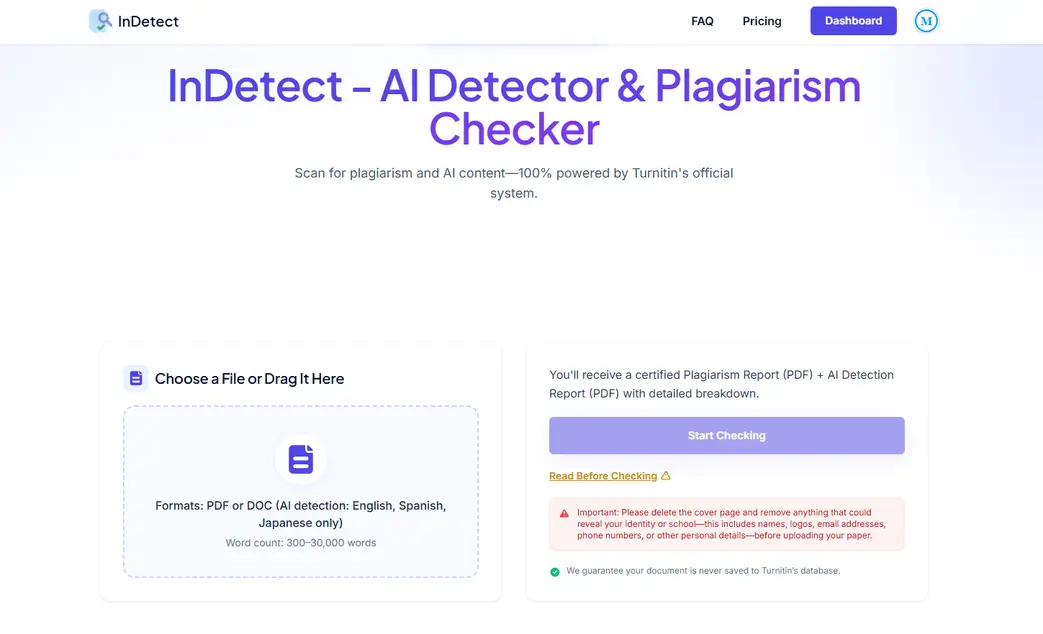
The only way to see a genuine Turnitin AI report before your professor does is through a service that routes your paper through an instructor-level Turnitin account. That is what turnitindetect.app does: you upload the document, the real Turnitin engine runs against it, and you get the actual report — including whether it will show 0%, *%, or a hard number.
The practical value of seeing % in advance is not that it lets you hide something. It is that it lets you stop worrying about a number you were never going to be judged on, and instead focus on the sections that would score above 20% if your draft had any. If your paper comes back at %, you know the AI dimension of the submission is settled. If it comes back at 38%, you have days to fix it rather than an email from your professor.
New users at turnitindetect.app get one free check. Papers are not added to Turnitin's student paper repository, and both the document and report are deleted from every system within 24 hours.
5.3 If you would rather not upload your paper anywhere
That is a legitimate position, and it deserves an honest answer rather than a sales pitch.
If your only question is "does my writing read as AI," run a local detector instead. GLTR (the Giant Language Model Test Room, from the University of Chicago) runs in your browser and never sees your file. Open-source options like DetectGPT and Fast-DetectGPT run on your own machine. They are less accurate than Turnitin and they do not pretend otherwise — which is exactly the right posture for a privacy-first check.
The trade-off is precision. A local tool tells you whether your prose is statistically unusual. Only the real engine tells you what your professor's screen will say.
6. FAQ: Turnitin *% AI Detection
*What does % mean on a Turnitin AI detection report?
It means your AI writing score fell between 1% and 19%. Since July 8, 2024, Turnitin does not surface numeric scores below the 20% threshold, and does not attribute highlights to them, because its testing found a higher incidence of false positives in that range. The asterisk signals that a low score exists but is not reliable enough to report.
*Is % the same as 0% on Turnitin?
No. 0% means Turnitin's model did not identify any qualifying text as likely AI-generated. *% means some text was flagged, but the total fell below the 20% reporting threshold. 0% is the only explicit low numeric result Turnitin displays.
Why does Turnitin not show the actual percentage below 20%?
To prevent misinterpretation. Turnitin's own documentation states that false positives are more common when the percentage is between 0 and 19, so the company suppresses the number and shows an asterisk instead. Reporting a precise figure like 7% would imply a measurement the model cannot support at that confidence level.
*Will my instructor see % or the real number?
Your instructor sees *%. The suppression happens at the report level, not at the student view. No score or highlights are attributed in the 1–19% range for anyone, and reports generated before July 8, 2024 were not retroactively updated.
*Can I still be accused of AI use with a % score?
Not on the basis of that score. Turnitin states explicitly that the AI writing indicator "should not be used as the sole basis for adverse actions against a student." An instructor may still raise concerns from other evidence — writing voice changes, missing drafts, inconsistent submission history — but the asterisk itself is not supporting evidence.
My Turnitin report shows a number below 20%. Is that a bug?
Only if it was generated after July 8, 2024. Turnitin's documentation confirms that reports generated before that date may still display a numerical score below 20%. The change applies to new submissions only and was not applied retroactively.
How do I find out my real AI score before I submit?
Turnitin's AI writing indicator is visible only to instructors and administrators by default. Some institutions enable draft dropboxes that expose the report to students. Otherwise, the only route to a genuine Turnitin report before submission is a service that runs the real engine through an instructor-level account, such as turnitindetect.app.
7. Conclusion: The Asterisk Is Turnitin Telling You It Does Not Know
Three sentences to carry forward.
A *% is not a hidden accusation — it is Turnitin publishing its own uncertainty, and doing so because its testing showed that low scores are disproportionately wrong. The 20% threshold exists to protect students from over-interpretation of statistical noise, and the absence of highlights in that range means there is nothing specific in your paper the system is pointing at.
The genuinely useful takeaway is not reassurance about this one report. It is that you now know the difference between a number Turnitin will stand behind (20% and up, with highlighted sentences) and a number it will not. Most students never learn that distinction, and most panic in exactly the wrong places — agonizing over an asterisk while never checking whether the draft would have crossed 20% with a different opening paragraph.
If you want to stop guessing, see the real report before your professor does. turnitindetect.app runs the actual Turnitin engine and returns the actual report — 0%, *%, or a hard number, with no interpretation layer between you and the result. And if you would rather never upload a paper anywhere, that is a reasonable choice too: run a local detector, keep your version history, and remember that no asterisk on a screen is the last word on what you are capable of writing.